
macOS Golden Gate Tweaks Liquid Glass Design for Better Readability
Apple is refining the 'Liquid Glass' interface in macOS Golden Gate, addressing user feedback from macOS Tahoe. Changes focus on improved transparency, readability, and consistency across applications.

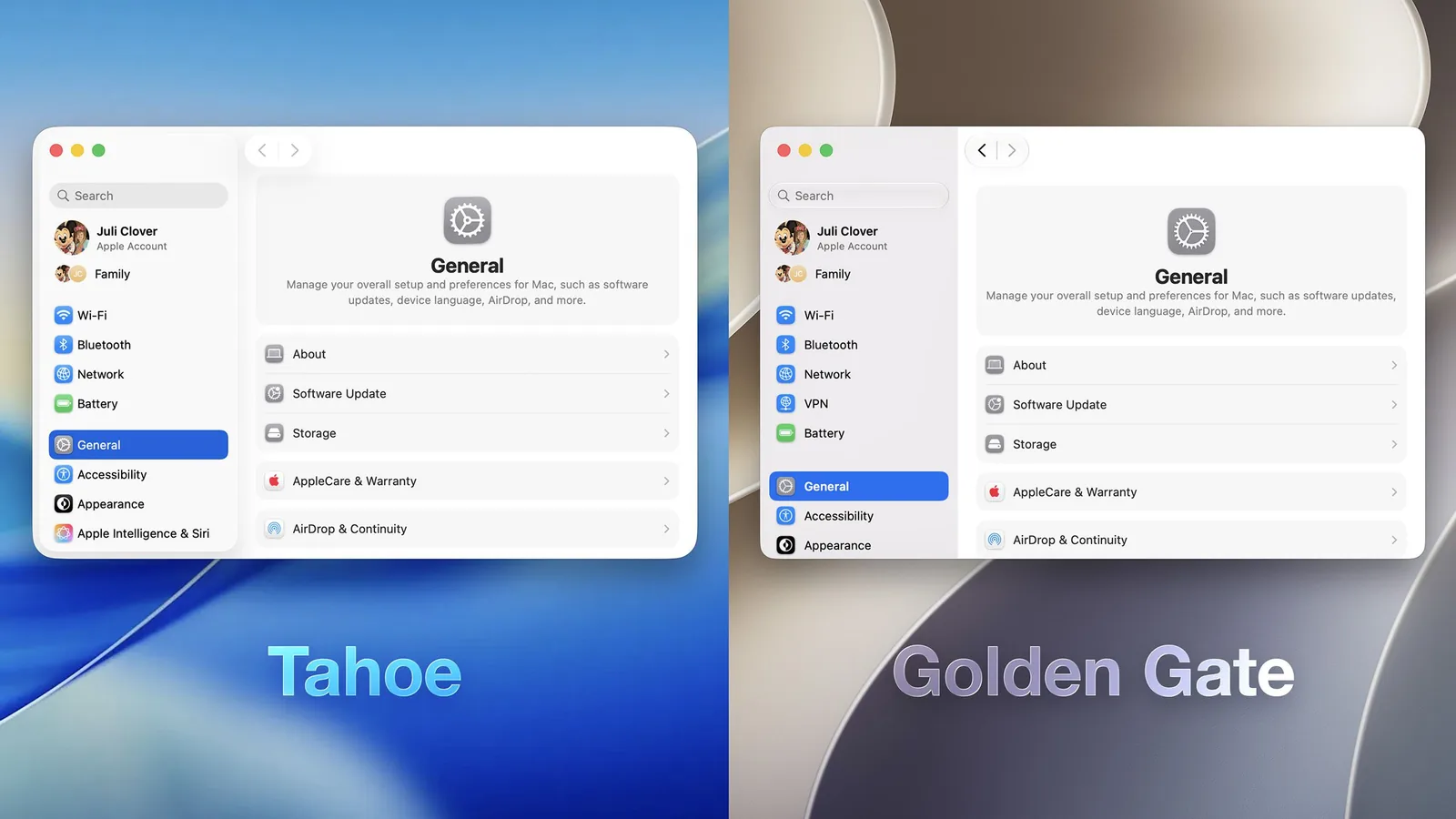
Apple is rolling out significant but subtle refinements to its 'Liquid Glass' design language in the upcoming macOS Golden Gate. Following user critiques of the initial implementation in macOS Tahoe, the tech giant is adjusting elements like transparency, window shapes, and sidebars to enhance readability and visual consistency for Mac users. The changes aim to address concerns raised on forums and social media platforms after the Tahoe update.
One of the most notable adjustments is a new 'Liquid Glass' slider found within System Settings > Appearance. This control allows users to fine-tune the translucency of interface elements. Options range from a clearer view that allows more of the background to show through, to a more opaque, tinted version designed to improve text legibility. While the clearest setting does not replicate the original 'Liquid Glass' preview shown at WWDC 2025, Apple has enhanced its diffusion of complex content, adding a darkened edge and brighter specular highlights to create a greater sense of depth and separation within the user interface.
Interface Consistency and Navigation Enhancements
To improve the overall user experience, macOS Golden Gate introduces more uniform toolbars across applications, making text headings and control groups easier to discern. A consistent corner radius is now applied to all windows, a departure from the more dramatically rounded corners seen in earlier macOS versions. This standardization fosters a more cohesive look and feel between different applications. Additionally, distinguishing an active window has been made simpler, thanks to updates to the sidebar design, opacity adjustments, and refined window shadows.
Sidebars have also undergone a transformation, moving from a floating design to an edge-to-edge format. This change reduces visual clutter by removing unnecessary sidebar shadowing. A welcome return for many users is the reintroduction of color to sidebar icons, a feature that was omitted in macOS Tahoe. While Apple has maintained its requirement for squircle-shaped Mac icons, the design of these icons themselves has been enhanced. They now feature additional layers of 'Liquid Glass' to improve detail and sharpness across light, dark, tinted, and clear modes. Furthermore, Apple is integrating icons into some menu bar items, aiming to streamline the process of locating and accessing commonly used actions.
The integration of High Dynamic Range (HDR) technology in macOS Golden Gate is set to bring increased depth and dimension to the overall interface. Beyond visual upgrades, the update also bundles the new Siri AI capabilities slated for iOS 27. Performance improvements are also a key focus, intended to make the Mac feel snappier and more responsive. The developer preview of macOS Golden Gate is currently available, with a public beta expected in July 2026. The final release is scheduled for this fall.