
iOS 27 Updates: New Lock Screen Options for iPhone
Apple's iOS 27 introduces four significant Lock Screen enhancements for iPhones, including AI-powered wallpaper generation and clock repositioning. The update aims to give users more creative control.

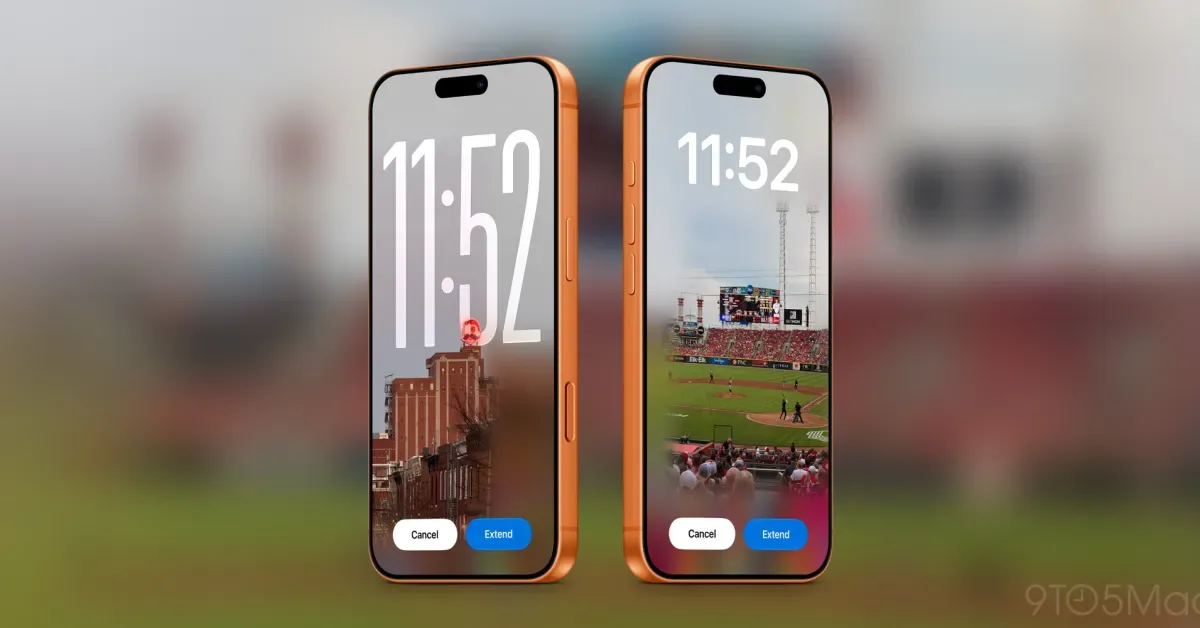
Apple is rolling out iOS 27, bringing a suite of new customization features to the iPhone's Lock Screen. The update focuses on giving users greater control over their device's appearance, with enhancements ranging from AI-driven wallpaper creation to more flexible clock placement and interactive widget management.
Among the key additions is an AI-powered photo editing tool called "Extend." This feature intelligently expands an image, allowing users to adjust aspect ratios, straighten horizons, or simply add more breathing room around the edges. The "Extend" feature is particularly useful for setting photos as wallpapers, automatically suggesting expansions if an image doesn't perfectly fit the iPhone's screen dimensions. This AI-generated content ensures a better fit and more aesthetic appeal for custom wallpapers.
Furthering the AI capabilities, iOS 27 significantly revamps "Image Playground," Apple's generative AI tool. Users can now create unique wallpapers directly from the Lock Screen's wallpaper picker or within Settings. The feature offers pre-set stylized options like "Retro Illustration" and "Animation," derived from the user's photo library. For those seeking truly original designs, Image Playground allows users to generate custom wallpapers from scratch by simply describing their desired image using natural language prompts. This brings a new level of personalization to the iPhone experience.
Lock Screen Clock and Widget Enhancements
Beyond AI-generated visuals, iOS 27 addresses long-standing user requests for clock customization. For the first time, users can now shrink the clock display on their Lock Screen. More significantly, the clock can be moved to the top row of widgets, freeing up valuable space for more prominent wallpaper display. While this might make the time less immediately visible from a distance, it prioritizes the visual impact of the wallpaper, aligning with the Lock Screen's role as a personal canvas.
Additionally, the update introduces a convenient way to manage the "Now Playing" widget. Users can now swipe away this widget from the Lock Screen, even while music or other media continues to play in the background. This feature helps prevent accidental taps on the widget and declutters the Lock Screen when users are focused on their wallpaper or other elements. The introduction of these Lock Screen features underscores Apple's commitment to user personalization and leveraging artificial intelligence to enhance device functionality.
The beta versions of iOS 27 are currently available to developers and public testers. A full public release is anticipated later this year, promising a more personalized and visually dynamic iPhone Lock Screen experience for all users. This update reflects a broader trend in mobile operating systems towards greater user control and AI integration in everyday features. The ability to generate custom wallpapers and reposition key interface elements signals a new era of iPhone personalization, moving beyond simple app icons to deeper aesthetic customization.